Chapter 39 — Onboard Remote Network — Single IPSec Tunnel & Static Route
This is the simplest remote network onboarding configuration: one IPSec tunnel from the branch CPE to an RN-SPN, with branch subnets declared as static routes. No BGP peering is required.
When to Use This Configuration
| Scenario | Use Single Tunnel + Static Routes |
|---|---|
| Branch has one WAN link | Yes |
| CPE does not support BGP | Yes |
| Branch subnets are stable and few | Yes |
| Need ECMP or multiple active tunnels | Use ch41 |
| Need dynamic route distribution | Use BGP (ch40) |
If a subnet is covered by both a static route and BGP (e.g. after later adding BGP alongside existing static routes), the static route takes precedence — see Chapter 40 for the full explanation.
Onboarding Steps
Navigation (Panorama):
Panorama > Cloud Services > Configuration > Remote Networks > Onboarding > Add
Navigation (Strata Cloud Manager):
Configuration > NGFW and Prisma Access > Configuration Scope > Prisma Access > Remote Networks > Add Remote Network
flowchart TD
    S1["Step 1<br/>Name + Location<br/>+ ECMP = None"]
    S2["Step 2<br/>Select IPSec<br/>Termination Node (RN-SPN)"]
    S3["Step 3<br/>Select primary<br/>IPSec Tunnel"]
    S4["Step 4<br/>Secondary WAN<br/>(optional backup tunnel)"]
    S5["Step 5<br/>Add Static Routes<br/>(branch subnets)"]
    S6["Steps 6-9<br/>Commit and Push"]
    S7["Verify Status"]

    S1 --> S2 --> S3 --> S4 --> S5 --> S6 --> S7
Step 1 — Name, Location, and ECMP Setting
| Field | Value / Notes |
|---|---|
| Name | Descriptive branch name (e.g. RN-To-US-Branch) — becomes the source zone identifier in logs |
| Location | Prisma Access compute location nearest to the branch (e.g. US-East) |
| ECMP Load Balancing | Set to None for single-tunnel deployments |
⚠️ The remote network name becomes a zone name in traffic logs. Avoid names that conflict with
trust,untrust, orinter-fw.
Strata Cloud Manager: the same wizard confirms these fields — Site Name, Prisma Access Location, and an ECMP Load Balancing toggle. For this chapter's single-tunnel scenario, leave ECMP Load Balancing disabled — see Chapter 41 for the ECMP-enabled case rather than explained here. (A separate "Region" field was not confirmed on the fetched documentation and isn't included here as a result — don't assume it exists without checking your own tenant's UI.)
Step 2 — Select the IPSec Termination Node (RN-SPN)
- Select the specific IPSec Termination Node within the chosen compute location (e.g.
us-east-pecan) - This node's Service Endpoint Address is what the branch CPE configures as its VPN peer IP
📷 PaloAlto screenshot — Remote network name, location, and termination node
Strata Cloud Manager: IPSec Termination Node is confirmed as the same field name and selection step in the SCM wizard — not a separate screen.
Step 3 — Select the IPSec Tunnel
- Select the primary IPSec tunnel from the predefined tunnel list (e.g.
CiscoASA-IPSec-Tunnel-Default) - If the required tunnel doesn't exist, create it first under
Network > IPSec Tunnelsin theRemote_Network_Template
Strata Cloud Manager: confirmed the tunnel/IKE setup uses the same core fields as Chapter 29's Service Connection SCM section — Branch Device Type, Branch Device IP Address (Static/Dynamic) with IKE ID if Dynamic, IKE Advanced Options, IPSec Advanced Options, Secret/Confirm Secret — see that chapter rather than repeating the full field list here.
Step 4 — Secondary WAN (Optional Backup Tunnel)
Enable Secondary WAN if the branch CPE has a second WAN link:
- Select or create the backup IPSec tunnel (e.g. CiscoASA-IPSec-Tunnel-Default-Backup)
- The backup tunnel uses the same RN-SPN but a different CPE interface/IP
- Failover is automatic — Prisma Access switches to the backup if the primary tunnel goes down
One genuine Remote-Network-specific difference from Chapter 29's Service Connection flow: Prisma Access requires a unique IPSec tunnel for each remote network's secondary WAN — a secondary-WAN tunnel cannot be reused across multiple remote network sites. This constraint isn't called out the same way for Service Connections' secondary WAN.
Step 5 — Add Static Routes
Click the Static Route tab, then click Add:
| Field | Example |
|---|---|
| Subnet | 10.10.10.0/24 |
Add one entry per branch subnet that Prisma Access needs to route to this site. These subnets are advertised to all connected mobile users and service connections.
📷 PaloAlto screenshot — Static routes tab in remote network onboarding
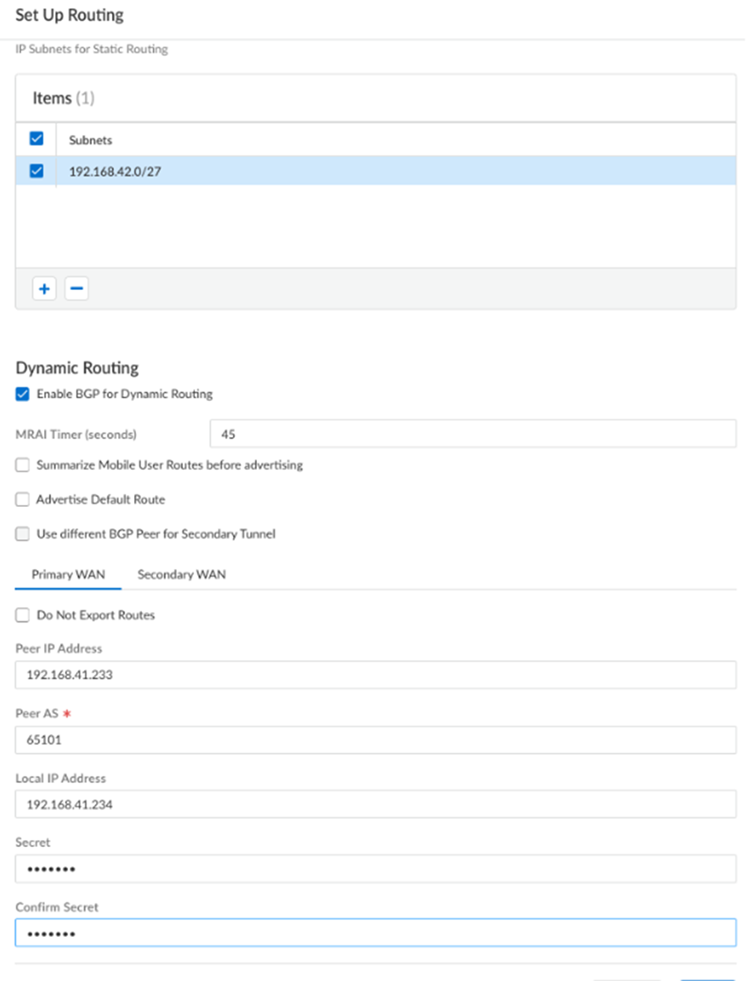
Click OK to save the remote network entry.
Strata Cloud Manager: static routes are entered directly in the same remote network add/edit screen, under a Static Routes tab — click Add and enter the subnet or IP address to secure at the branch. This maps directly onto Step 5 above; no separate screen or rewrite needed.
Steps 6–9 — Commit and Push
Commit > Commit and Push- Edit Selections → Select Prisma Access → Remote Networks
- Click OK → Commit and Push
Strata Cloud Manager: Commit is replaced with Push Config, per the terminology already established in Chapter 28 — not re-explained here.
Verify Remote Network Status
Navigation (Panorama):
Panorama > Cloud Services > Status > Remote Networks
Confirm: - Tunnel Status = Connected for the primary tunnel - The remote network entry shows the correct Service Endpoint Address
If the tunnel shows Disconnected, check: - Branch CPE peer IP matches the Service Endpoint Address - Pre-shared key matches on both sides - IKE/IPSec crypto profiles match (Phase 1 and Phase 2)
Strata Cloud Manager: see Chapter 30's Config Status (In sync/Out of sync) and Insights explanation for how to verify push status and connectivity — not repeated here. The same troubleshooting checks above (peer IP, pre-shared key, crypto profile match) apply regardless of management platform.
Managing at Scale (Strata Cloud Manager)
Worth knowing, not a deep dive: starting at Prisma Access 5.2, a tenant can onboard up to 25,000 remote networks and 50,000 IKE gateways. To make managing a list at that scale practical, the SCM web interface added pagination (choose how many rows to display), filtering, and a Group By Compute Location option (collapses all sites under their compute location). This is purely an SCM UI detail — the Panorama-facing content in this manual doesn't cover list-scale UI features at all.
Key Takeaways
- Single tunnel + static routes is the simplest onboarding path — no BGP required
- ECMP must be set to None for single-tunnel deployments
- Remote network name becomes the source zone identifier in logs — avoid reserved zone names
- Static routes declare which branch subnets Prisma Access should route to this site
- Service Endpoint Address (RN-SPN public IP) is the VPN peer address configured on the branch CPE
- SCM's tunnel/IKE fields match Chapter 29's Service Connection SCM section, except one RN-specific rule: a secondary WAN tunnel cannot be reused across sites
- Prisma Access 5.2+ supports up to 25,000 remote networks and 50,000 IKE gateways per tenant; SCM adds pagination, filtering, and Group By Compute Location to manage that scale
Previous: Chapter 38 — Remote Network Bandwidth Allocation · Next: Chapter 40 — Onboard Remote Network — BGP