Integrate Git, MkDocs, and Obsidian
This guide explains how to use Obsidian as your note-editing front-end while publishing your notes as a MkDocs site — all tracked in Git.
How It Fits Together
- Obsidian = your writing environment (local Markdown editor)
- MkDocs = your publishing engine (converts
.mdfiles to a static site) - Git = version control and deployment to GitHub Pages
The key insight: MkDocs doesn't care where your Markdown files come from. Point it at your Obsidian vault and it will build a site from it.
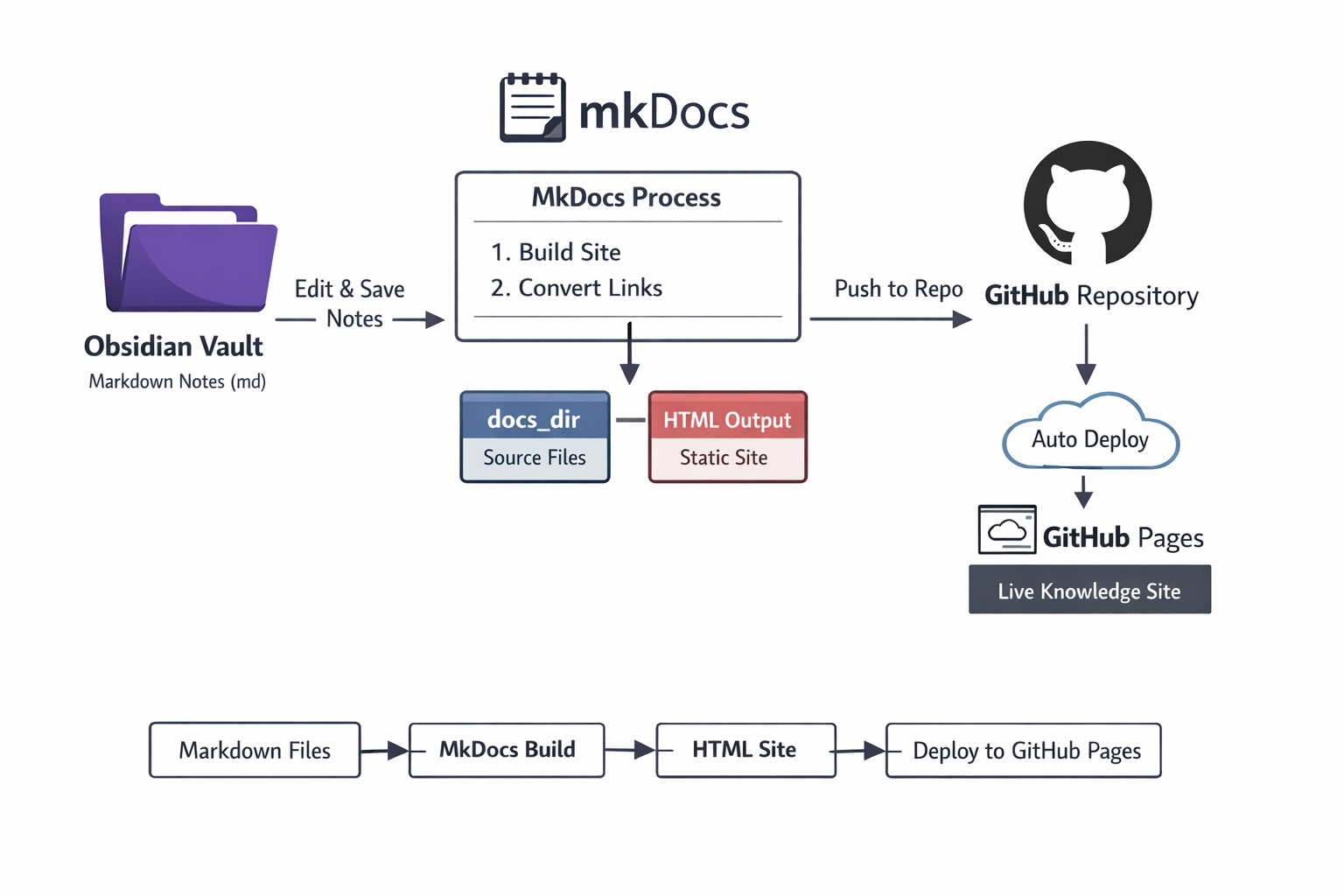
1. Recommended Folder Structure
Keep MkDocs config and the Obsidian vault in the same Git repo:
notes/                    ← Git repo root
├── mkdocs.yml
├── .gitignore
├── venv/
└── docs/                 ← Obsidian vault AND MkDocs docs_dir
    ├── index.md
    ├── articles/
    ├── projects/
    └── assets/           ← Images and attachments (set in Obsidian settings)
Set Obsidian's "Files and links > Default location for new attachments" to assets/ so images land in a predictable, MkDocs-friendly path.
2. Point MkDocs at Your Vault
In mkdocs.yml, set docs_dir to your vault folder:
site_name: My Knowledge Base
docs_dir: docs            # <-- your Obsidian vault folder
site_dir: site            # <-- generated HTML output (gitignored)
theme:
  name: material
Everything you write in Obsidian automatically becomes part of your MkDocs site on the next mkdocs serve or mkdocs build.
3. Handle Image Paths
Obsidian pastes images with paths like:
MkDocs resolves these paths relative to the Markdown file's location. This works correctly as long as your attachments folder is inside docs/ and Obsidian is configured to save attachments there.
Obsidian settings to configure:
Settings → Files and links → Default location for new attachments→In the folder specified below- Folder:
assets
This keeps all images under docs/assets/, which MkDocs can find without any path rewriting.
4. Wikilinks vs Standard Markdown Links
Obsidian uses wikilinks by default ([[Page Name]]). MkDocs does not understand wikilinks — it requires standard Markdown links ([Page Name](page-name.md)).
Fix: In Obsidian, switch to standard Markdown links:
Settings → Files and links → Use [[Wikilinks]] → disable
With this off, Obsidian writes [Page Name](page-name.md) which MkDocs handles correctly.
5. Exclude Obsidian-Specific Files
Obsidian stores configuration in a .obsidian/ folder inside your vault. These files should not become pages on your site.
Add to your mkdocs.yml:
And add to .gitignore if you don't want to commit Obsidian workspace state:
The core .obsidian/ config (themes, plugins, settings) is worth committing so the vault is reproducible across machines.
6. Daily Workflow
- Open Obsidian, write notes normally
- Run
mkdocs serveto preview the site locally - Commit changes and deploy:
Key Takeaways
- Set
docs_dirinmkdocs.ymlto point at your Obsidian vault - Store attachments in
docs/assets/for compatible image paths - Disable wikilinks in Obsidian — use standard Markdown links instead
- Exclude
.obsidian/,templates/, and.canvasfiles from MkDocs - Git tracks both your notes source and drives deployment to GitHub Pages