Chapter 23 — Network Requirements & Prerequisites for ZTNA Connector
Before deploying any Connector VM, the network environment must meet the port, MTU, DNS, and IP planning requirements described in this chapter.
Required Outbound Ports
The Connector VM initiates all connections — no inbound rules are needed on the DC firewall. The following egress rules must be permitted from the Connector VM's WAN interface (Port 1):
| Protocol | Port | Destination | Purpose |
|---|---|---|---|
| TCP | 443 | *.cgnx.net |
HTTPS to ZTNA Connector Controllers |
| UDP | 500 | Prisma Access ZTT | IKE (IPSec key exchange) |
| UDP | 4500 | Prisma Access ZTT | IPSec NAT traversal |
| IP/50 | — | Prisma Access ZTT | ESP (if public IP used, no NAT) |
| UDP | 123 | NTP servers | Time synchronisation |
| UDP/TCP | 53 | DNS servers | Name resolution |
For app-facing traffic (Port 2 in two-arm deployments):
| Protocol | Port | Destination | Purpose |
|---|---|---|---|
| UDP/TCP | 53 | Private DNS | App FQDN resolution |
| TCP/UDP | app-specific | App servers | Application traffic |
| TCP or ICMP | — | App servers | Health probes |
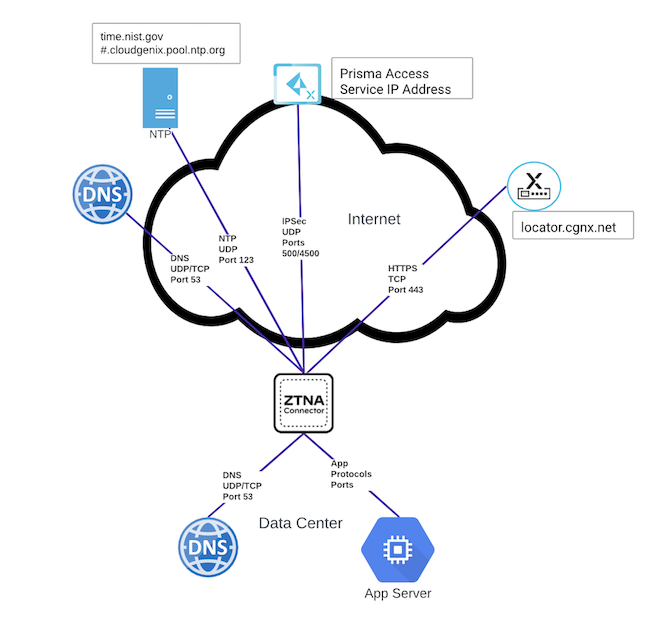
MTU Requirement
Maximum UDP payload: 1,300 bytes (including headers)
All paths between the Connector VM and the private application server must support this MTU. Exceeding it causes packet fragmentation that breaks IPSec tunnels.
- Configure interface MTU and MSS clamping on the Connector's app-facing port if needed
- This limit applies to the path from Connector → app server, not to the WAN-facing IPSec path
SSL Decryption — Disable for Controller Traffic
SSL decryption must be disabled for sessions from the Connector VM to the ZTNA Connector Controllers (*.cgnx.net). Inspection of controller traffic will break the Connector's authentication and tunnel establishment.
DNS Requirements
The Connector VM needs two categories of DNS resolution:
flowchart TD
    CONN["Connector VM"]
    DNS_PUB["Public DNS<br/>resolves *.cgnx.net<br/>and locator.cgnx.net"]
    DNS_PRIV["Private DNS<br/>resolves app FQDNs<br/>(e.g. app1.example.com)"]

    CONN -->|controller discovery| DNS_PUB
    CONN -->|app target resolution| DNS_PRIV
DNS configuration rules:
- At least one server that resolves public FQDNs (including locator.cgnx.net for nearest-node discovery)
- At least one server that resolves private application FQDNs
- The Connector queries all configured DNS servers in parallel — fastest response wins
- CNAME-based load balancing is supported (multiple A records per FQDN)
- All Connectors within a Connector Group must use identical DNS server configuration
IP Address Planning
Two internal address blocks must be assigned at onboarding time and cannot overlap with any existing routes:
| Block | Purpose | Minimum Size |
|---|---|---|
| Application IP Block | Represents private apps internally within Prisma Access | Depends on app count |
| Connector IP Block | Assigned to Connector IPSec tunnel interfaces | /27 per Connector (32 IPs) |
Planning rules: - Reserve at least a /27 per Connector in the Connector IP Block - Use RFC 1918 (10.0.0.0/8, 172.16.0.0/12, 192.168.0.0/16) or RFC 6598 (100.64.0.0/10) addresses - RFC 6598 is not supported in a default Prisma Access deployment — it must be activated by your Palo Alto Networks team before it can be used; it isn't simply a self-service "separate pool" toggle - Once an address pool is set to RFC 1918, it cannot be changed back to RFC 6598 for Connector IP blocks without deleting all Connectors and Connector Groups first (Application IP blocks are more flexible and can be changed back) - These blocks must not overlap with: existing DC subnets, Service Connection subnets, Remote Network subnets, or Mobile User IP pools - Configure DNS entries on local interfaces so the Connector can resolve app FQDNs
Firewall Between Connector and App
If a firewall exists between the Connector VM and the private app server, it must allow: - App-protocol traffic (e.g. TCP 443 for HTTPS apps) from the Connector VM to the app server - Health probe traffic (TCP or ICMP) from the Connector VM to the app server
The Connector's app-facing IP (from the Connector IP Block /27) is the source address for all such traffic.
Deployment Checklist
| Requirement | Detail |
|---|---|
Egress TCP 443 to *.cgnx.net |
Controller connectivity |
| Egress UDP 500/4500 to Prisma Access | IPSec/IKE |
| MTU ≤ 1,300 bytes on app-facing path | Fragmentation prevention |
| SSL decryption disabled for controller traffic | Auth integrity |
| Public + private DNS configured | Controller and app FQDN resolution |
| Application IP Block assigned | No overlap with DC/SC/RN/MU subnets |
| Connector IP Block (/27 per Connector) assigned | No overlap with DC/SC/RN/MU subnets |
| App firewall allows Connector-to-app traffic | Application access |
| Time zone set to UTC (on-premises only) | NTP/log consistency |
| vMotion/snapshots disabled for Connector VMs | Operational stability |
Key Takeaways
- Connector initiates all tunnels outbound — only egress firewall rules required (TCP 443, UDP 500/4500)
- MTU on the app-facing path must not exceed 1,300 bytes
- SSL decryption must be disabled for controller traffic to
*.cgnx.net - Two IP blocks required: Application IP Block and Connector IP Block (/27 minimum per Connector)
- All IP blocks must be unique across the entire Prisma Access deployment — no overlap with SC, RN, or MU subnets
Previous: Chapter 22 — ZTNA Connector vs Service Connections · Next: Chapter 24 — Enable & Configure ZTNA Connector