Chapter 22 — ZTNA Connector vs Service Connections & Hosting Environments
This chapter compares ZTNA Connector and Service Connections to clarify when to use each, and documents the supported platforms and hardware requirements for deploying Connector VMs.
ZTNA Connector vs Service Connections
The two technologies provide private application access through different models. Neither is strictly a replacement for the other — they address different scenarios.
| Capability | Service Connection | ZTNA Connector |
|---|---|---|
| Overlapped private networks (same RFC 1918 space) | No — requires NAT | Yes |
| Access to all ports and protocols | Yes | Limited — app-specific targets |
| Automatic tunnel establishment to Prisma Access | No — manual IPSec/BGP config | Yes |
| Automatic Prisma Access location discovery | No | Yes |
| Autoscaling bandwidth (up to 6 Gbps per Connector Group) | No | Yes |
| Access via IP address and subnet | Yes | Yes (from PA 5.0) |
| Server-initiated traffic (e.g. remote help desk) | Yes | Limited (from PA 5.0 with add-on) |
| Unique client IP per session (AD, SMB) | Yes | No |
| Dynamic port protocols (FTP active, VoIP) | Yes | No |
| Hybrid with on-prem NGFW (User-ID policies) | Yes | No |
Decision guide:
flowchart TD
    Q1{"Overlapped RFC 1918<br/>across DCs?"}
    Q2{"Need full network<br/>access (all ports)?"}
    Q3{"Need AD/SMB or<br/>dynamic ports?"}
    ZTNA["Use ZTNA Connector"]
    SC["Use Service Connection"]

    Q1 -->|Yes| ZTNA
    Q1 -->|No| Q2
    Q2 -->|Yes| Q3
    Q2 -->|No| ZTNA
    Q3 -->|Yes| SC
    Q3 -->|No| ZTNA
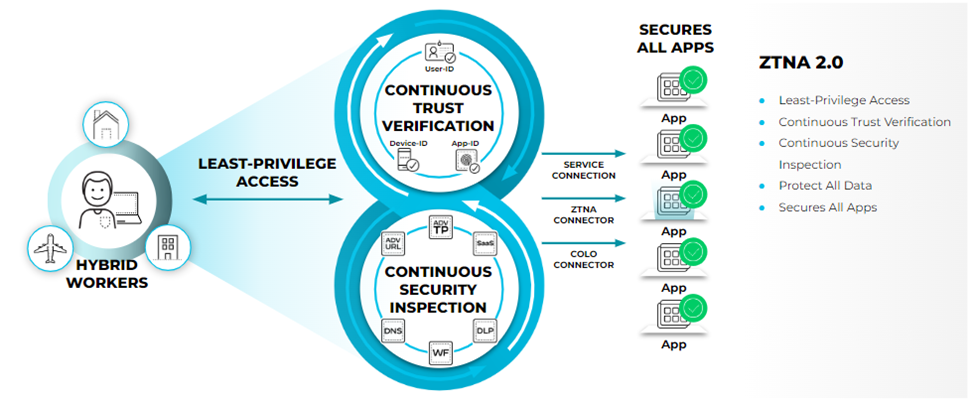
📷 PaloAlto diagram — ZTNA Connector vs Service Connections comparison
| Use Case | ZTNA Connector Support | Service Connection Support |
|---|---|---|
| Access to applications in overlapped networks | √ | — |
| Access to all ports and protocols for client-initiated application traffic | √ | √ |
| Automatic tunnel establishment to Prisma Access | √ | — |
| Automatic Prisma Access location discovery | √ | — |
| Access to private apps using IP addresses and subnets | √ | √ |
| Server-initiated traffic (such as a remote help desk) reaching out to a managed device (GlobalProtect mobile user or remote network). | √ | √ |
| Applications or services that require a unique client IP address | √ | √ |
| Access to applications with dynamic ports (such as FTP Active mode or VoIP) | — | √ |
|Hybrid deployments with on-premises next-generation firewalls where policy rules based on User-ID are applied|√|√|
Supported Hosting Environments
Connector VMs can be deployed on:
| Platform | Image Format | Notes |
|---|---|---|
| Amazon AWS | Cloud Marketplace or CSP | m5.xlarge per region |
| Google Cloud Platform | Cloud Marketplace or CSP | n2-standard-4 per region |
| Microsoft Azure | Cloud Marketplace or CSP | Standard_D4_v3 per region |
| Oracle Cloud (OCI) | CSP | VM.Standard.E5.Flex |
| VMware ESXi | OVA image | Thick Provisioned Lazy Zeroed disk |
| KVM | qcow2 image | Two-arm recommended |
| Microsoft Hyper-V | VHD image | Two-arm recommended |
Hardware Specifications
All Connector VMs require the same minimum resources regardless of platform:
| Resource | Requirement |
|---|---|
| vCPU | 4 |
| Memory | 16 GB (8 GB acceptable for ESXi/Hyper-V) |
| Disk | 40 GB |
Deployment Topologies
| Topology | Interfaces | Supported On |
|---|---|---|
| One-arm | Single interface (WAN + app traffic combined) | AWS, Azure, GCP, OCI, ESXi |
| Two-arm | Separate WAN-facing and app-facing interfaces | KVM, Hyper-V (recommended) |
One-arm is simpler; two-arm provides granular separation between internet and DC traffic.
Operational Constraints
- vMotion, snapshots, and live VM migration are not supported — Connector VMs must remain static
- IPv6 connectivity to the Prisma Access controller is not supported
- RFC 6598 shared-address space is not supported in a default deployment — requires Palo Alto Networks to activate it (see Chapter 23 for IP planning detail)
- Service Connection subnets must not overlap with ZTNA IP blocks (Application IP Block or Connector IP Block)
- Do not mix NGFW (Service Connection) and ZTNA Connectors in the same Connector Group
- Limit a single FQDN to 4 Connectors per region
Key Takeaways
- Service Connection: full network access, unique client IPs, dynamic ports, NGFW integration — but no overlap support and manual tunnel config
- ZTNA Connector: automated tunnels, overlap support, auto-scaling, app-granular — but no dynamic ports or unique client IPs
- Connector VMs run on all major cloud platforms plus on-premises (ESXi, KVM, Hyper-V)
- Hardware minimum: 4 vCPU, 16 GB RAM, 40 GB disk on all platforms
- vMotion and snapshots not supported; ZTNA and SC IP blocks must not overlap
Previous: Chapter 21 — ZTNA Use Cases & Packet Flow · Next: Chapter 23 — Network Requirements & Prerequisites