Chapter 7 — Service Infrastructure & Subnet Planning
The service infrastructure is the private IP fabric Prisma Access uses internally to connect MU-SPNs, RN-SPNs, and Service Connection CANs. You provide the IP address ranges; Prisma Access uses them to build the internal mesh. This planning must happen before any deployment step — changing the infrastructure subnet after deployment requires a maintenance window and PaloAlto SRE involvement.
What Needs to Be Planned
Three address allocations are required; a fourth applies if you use dynamic routing:
graph TD
    A["Your IP Address Space<br/>(corporate subnets)"]
    B["Infrastructure Subnet<br/>/24 minimum<br/>RFC 1918 recommended"]
    C["Mobile User IP Pools<br/>/24 blocks per gateway<br/>RFC 1918 recommended"]
    D["BGP Private AS Number<br/>RFC 6996 compliant<br/>only if using BGP"]

    A --> B
    A --> C
    A --> D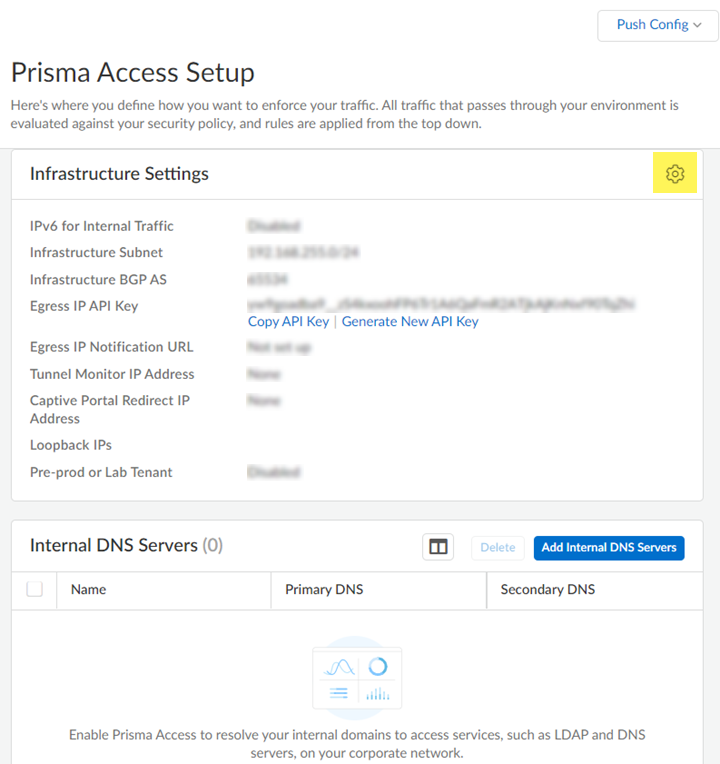
Infrastructure Subnet
This is the most critical IP allocation — it is the backbone of the entire Prisma Access internal network.
Requirements:
- Minimum /24 (e.g. 172.16.55.0/24) — a larger number of addresses is consumed internally
- RFC 1918 space strongly recommended — public IP use is supported but risks conflicts with internet address space
- Must not overlap with:
- Any corporate subnet in use on your network
- Mobile user IP pools
- Remote network source subnets
Verified 2026-07-09 — the /24 minimum and RFC 1918 recommendation above are confirmed still current, quoted directly from Palo Alto's live documentation: "you must designate a /24 subnetwork (for example, 172.16.55.0/24)," and public IPs are "supported" but "not recommend[ed]... because of possible conflicts with the internet public IP address space."
Reserved ranges — never use:
| Reserved Range | Reason |
|---|---|
| 169.254.0.0/16 | Link-local — reserved internally by Prisma Access |
| 100.64.0.0/10 | Shared address space (RFC 6598) — reserved internally by Prisma Access |
Verified 2026-07-09 — both reserved ranges confirmed still current, quoted directly: "Do not specify any subnets that overlap with the 169.254.0.0/16 and 100.64.0.0/10 subnet range because Prisma Access reserves those IP addresses and subnets for its internal use."
Sizing beyond the minimum — added 2026-07-09, genuinely missing guidance, not a correction: the flat /24 minimum above is the hard floor, but current Palo Alto guidance gives more specific, actionable sizing based on deployment scale:
| Deployment Scale | Recommended Infrastructure Subnet |
|---|---|
| Small — fewer than 50 sites and fewer than 2,500 mobile users | /24 |
| Medium — fewer than 100 sites and fewer than 5,000 mobile users | /23 |
| Larger — more than 100 sites, more than 5,000 mobile users, or expected future growth | Contact Palo Alto Networks to evaluate sizing — no fixed upper-bound guidance is published |
This is additive to, not a replacement for, the /24 minimum above — the minimum is the absolute floor; this table tells you when to size beyond it.
⚠️ Changing the infrastructure subnet after deployment requires contacting your PaloAlto account representative, who will engage the SRE team and schedule a maintenance window. Changing it outside a maintenance window risks a Prisma Access outage and inconsistent feature behaviour. Get this right before go-live.
Mobile User IP Address Pools
Mobile users are assigned IP addresses from pools you provide. Prisma Access allocates from these pools in /24 blocks per gateway location, adding more blocks as user count grows.
Requirements:
- RFC 1918 space recommended
- Avoid the same reserved ranges: 169.254.0.0/16 and 100.64.0.0/10
- Allocate at minimum 2× the number of mobile devices expected — accounts for BYOD policies, device re-registrations, and growth (still a valid capacity-planning heuristic, confirmed independent of the sizing model below)
- Must not overlap with the infrastructure subnet or corporate subnets
Sizing model — corrected 2026-07-09. This table previously tied pool size directly to a mobile-user-count tier. Confirmed via direct fetch of Palo Alto's current documentation that the real, documented sizing driver is regional deployment scope, not user count directly — the minimum required pool size for a Worldwide address pool depends on how many regions it spans:
| Regional Scope | Minimum Pool Size |
|---|---|
| 1–2 regions | /23 (512 addresses) — confirmed as the minimum required for either a Worldwide or a regional pool |
| 3+ regions | /19 (8,192 addresses) — as a single pool or spread across multiple pools |
| Per-region pool (if allocating separately per region) | /23 minimum in any individual region |
These two framings aren't contradictory in practice — larger mobile user populations typically correlate with broader regional deployment, so the two considerations tend to compound rather than conflict. But the actual documented requirement Prisma Access enforces (the SCM/Panorama UI validates pool size and will prompt you to increase it) is tied to regions, not directly to a headcount threshold — treat regional scope as the real driver, and use the 2× expected-device heuristic above for how large to size within whatever regional-scope minimum applies to you.
BGP Private AS Number
Required only if you plan to use dynamic routing (BGP) for Remote Networks or Service Connections.
- Must be an RFC 6996-compliant private AS number
- Accepted formats:
- 4-byte AS Plain:
64512–65534or4200000000–4294967294 - AS Dot notation: e.g.
0.64512
Choose an AS number that does not conflict with any existing BGP configuration in your corporate network.
Verified 2026-07-09 — the RFC 6996 AS ranges above are confirmed still current, quoted directly: "Accepted formats are 4-Byte AS Plain [64512-65534],[4200000000-4294967294] or AS Dot [0.64512-0.65534]... notation."
Consistency check (2026-07-09): this chapter's IP/AS addressing guidance doesn't conflict with anything established in Chapter 38 (Remote Network bandwidth allocation) or Chapter 6 (licensing units) — those cover bandwidth sizing and unit-of-license counting respectively, which are separate concerns from the address-planning guidance here. No cross-reference needed beyond this note.
Planning Checklist
Before starting deployment configuration, confirm:
- [ ] Infrastructure subnet selected (min /24, RFC 1918, no overlaps, no reserved ranges)
- [ ] Mobile user IP pools sized (2× expected devices, /24-aligned, no overlaps)
- [ ] BGP private AS number reserved (if using dynamic routing)
- [ ] Infrastructure subnet documented and communicated to all network teams — changing it later is a major operation
Key Takeaways
- The infrastructure subnet is Prisma Access's internal backbone — choose it carefully; changing it post-deployment requires a maintenance window
- Minimum /24 for the infrastructure subnet; reserve at least 2× expected device count for mobile user pools
- Added 2026-07-09 — beyond the /24 floor, size the infrastructure subnet by deployment scale: /24 for small (<50 sites, <2,500 mobile users), /23 for medium (<100 sites, <5,000 mobile users), contact Palo Alto for larger
- Corrected 2026-07-09 — Mobile User IP Pool minimum sizing is driven by regional deployment scope, not a flat mobile-user-count tier: /23 minimum for 1–2 regions, /19 minimum for 3+ regions, /23 minimum per region if allocating separately — the 2× expected-devices heuristic still applies within whatever regional minimum applies
- Avoid
169.254.0.0/16and100.64.0.0/10in all Prisma Access allocations - BGP private AS is required only for deployments using dynamic routing
- Complete all IP planning before touching any Prisma Access configuration screen
Previous: Chapter 6 — Prisma Access Licensing & Management Models · Next: Chapter 8 — Service Connections Planning