Chapter 36 — Prisma Access Zones
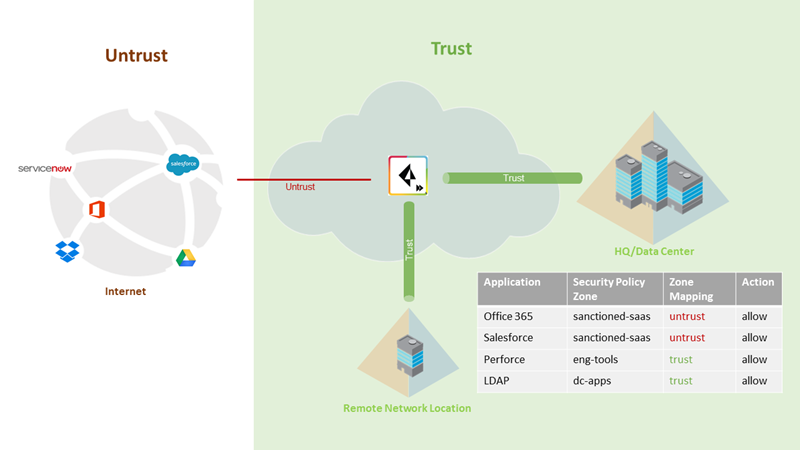
Security zones are the traffic segments that policy rules reference as source and destination. Prisma Access enforces three fixed zones — understanding their purpose and restrictions is essential before writing any security policy.
The Three Prisma Access Zones
| Zone | Traffic It Covers | Default Trust Level |
|---|---|---|
| Trust | All onboarded sources — Service Connections, Mobile Users (GP), Remote Networks | Trusted (internal corporate) |
| Untrust | All traffic not explicitly mapped to Trust — internet, SaaS, unknown sources | Untrusted (external) |
| Clientless VPN | HTML5/browser-based remote access to internal web apps (no agent required) | Always mapped to Trust — cannot be changed |
graph TD
    MU["💻 Mobile User<br/>(GlobalProtect)"]
    RN["🏬 Remote Network<br/>(Branch IPSec)"]
    SC["🔗 Service Connection<br/>(DC / HQ)"]
    INT["🌐 Internet / SaaS"]
    CVPN["🌐 Clientless VPN<br/>(browser-based)"]

    MU & RN & SC -->|Trust zone| PA["☁️ Prisma Access"]
    INT -->|Untrust zone| PA
    CVPN -->|Trust zone<br/>(fixed)| PA
Zone Mapping
All traffic defaults to Untrust until explicitly mapped. To allow traffic from Mobile Users, Remote Networks, or Service Connections to reach corporate resources, you must create zone mappings that associate those sources with the Trust zone.
| Traffic Type | Zone to Map To |
|---|---|
| Mobile users (GlobalProtect) | Trust |
| Remote network branches | Trust |
| Service connection (DC/HQ) | Trust |
| Internet-bound traffic | Untrust (leave as default) |
| SaaS applications | Untrust (leave as default) |
| Clientless VPN | Trust (fixed — cannot be changed) |
Zone mappings are configured per Prisma Access component in its respective template (Panorama) or folder (Strata Cloud Manager) — see Chapter 32 for how these concepts map to each other. The zone model itself — the three fixed zones, their trust levels, and the reserved names below — is a Prisma Access service-level construct, not something that differs between management platforms.
Reserved Zone Names — Do Not Reuse
Prisma Access uses several zone names internally. Creating a custom zone with any of these names causes conflicts and policy enforcement failures:
| Reserved Name | Used By |
|---|---|
trust |
Prisma Access Trust zone |
untrust |
Prisma Access Untrust zone |
inter-fw |
Internal Prisma Access node-to-node communication |
| Remote network names | Used as source zones in traffic logs for each onboarded RN site |
⚠️ Never create a custom zone named
trust,untrust, orinter-fw. These names are reserved for Prisma Access internal use. Using them for custom zones corrupts zone-based policy matching and produces unpredictable security policy behaviour.
Also avoid naming your remote network sites with names that conflict with existing zone names — each remote network site name becomes a source zone identifier in logs.
Writing Policy Rules with Zones
Security policy rules in the predefined device groups use zones as source and destination:
| Typical Rule | Source Zone | Destination Zone |
|---|---|---|
| Allow branch users to reach DC apps | Trust (RN) | Trust (SC) |
| Allow mobile users to reach DC apps | Trust (MU) | Trust (SC) |
| Allow internet access from branches | Trust (RN) | Untrust |
| Block inbound internet to DC | Untrust | Trust (SC) |
| Allow Clientless VPN to web apps | Trust (CVPN) | Trust (SC) |
The inter-fw zone is used by Prisma Access itself for internal SPN-to-SPN traffic — do not write rules targeting this zone unless specifically directed by PaloAlto TAC.
Key Takeaways
- Three zones: Trust (onboarded internal sources), Untrust (internet/external), Clientless VPN (fixed Trust — cannot change)
- All traffic defaults to Untrust — explicitly map Mobile Users, Remote Networks, and Service Connections to Trust
- Never create custom zones named
trust,untrust, orinter-fw— these are reserved by Prisma Access - Remote network site names become zone identifiers in logs — avoid names that conflict with reserved zone names
- Clientless VPN zone is permanently mapped to Trust and cannot be remapped
Previous: Chapter 35 — Inheritance Precedence & Predefined Templates · Next: Chapter 37 — Remote Network Templates, Device Groups & Zone Mapping