Chapter 21 — ZTNA Use Cases & Packet Flow
This chapter covers the three primary deployment scenarios for ZTNA Connector and traces the exact packet path from a user device to a private application.
Use Case 1 — Overlapped Private Networks
When multiple data centres or partner networks use the same RFC 1918 address space, traditional routing breaks — each SC would need NAT to disambiguate identical prefixes.
ZTNA Connector solves this because access is app-based, not network-based:
- Apps are identified by FQDN or IP subnet, not by routing prefix
- No IP routing configuration needed between DCs
- Overlapping 10.x.x.x subnets in different DCs can coexist without NAT
graph TD
    USER["💻 User"]
    PA["☁️ Prisma Access"]
    DC_A["DC — East<br/>App: 10.1.1.10<br/>(app1.example.com)"]
    DC_B["DC — West<br/>App: 10.1.1.10<br/>(app2.example.com)"]

    USER -->|access by FQDN| PA
    PA -->|Connector A| DC_A
PA -->|Connector B| DC_B- Prisma Access routes to the correct Connector based on the FQDN target — the overlapping IP is irrelevant to the user
- Each Connector Group uses its own IP block, preventing collision at the Prisma Access layer
Use Case 2 — Data Centre to Cloud Migration
During a migration, the same application may temporarily exist in both the on-premises DC and a cloud environment.
- Deploy a Connector in the on-premises DC and another in the cloud (AWS, Azure, GCP)
- Both Connectors are added to the same Connector Group
- Traffic is load-balanced or failed-over transparently — users see no change
- Once migration completes, remove the on-premises Connector from the group
graph TD
    USER["💻 User"]
    PA["☁️ Prisma Access"]
    CG["Connector Group"]
    ONPREM["On-Prem DC<br/>Connector"]
    CLOUD["Cloud (AWS/Azure)<br/>Connector"]
    APP["🖥️ Private App"]

    USER --> PA --> CG
    CG --> ONPREM --> APP
    CG --> CLOUD --> APP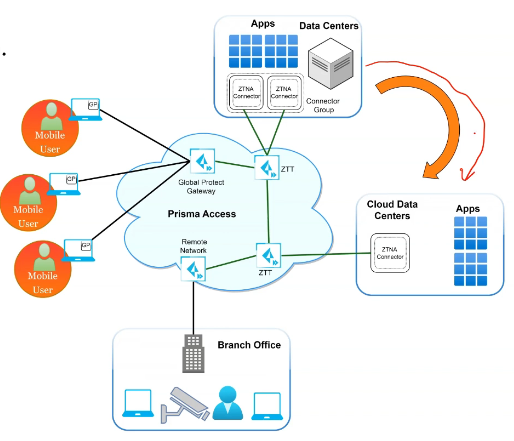
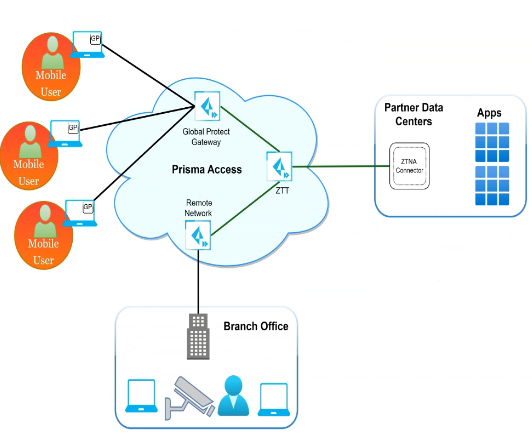
Use Case 3 — Partner Network Access
Give partner organisations access to specific applications without establishing a full network-level trust relationship:
- Deploy a Connector in the partner network (or in a DMZ accessible to the partner)
- Define only the required app(s) as Targets in that Connector Group
- Partners access only those apps — no access to other DC resources
- No manual IPSec or routing configuration between the main network and the partner
How ZTNA Connector Works — Packet Flow
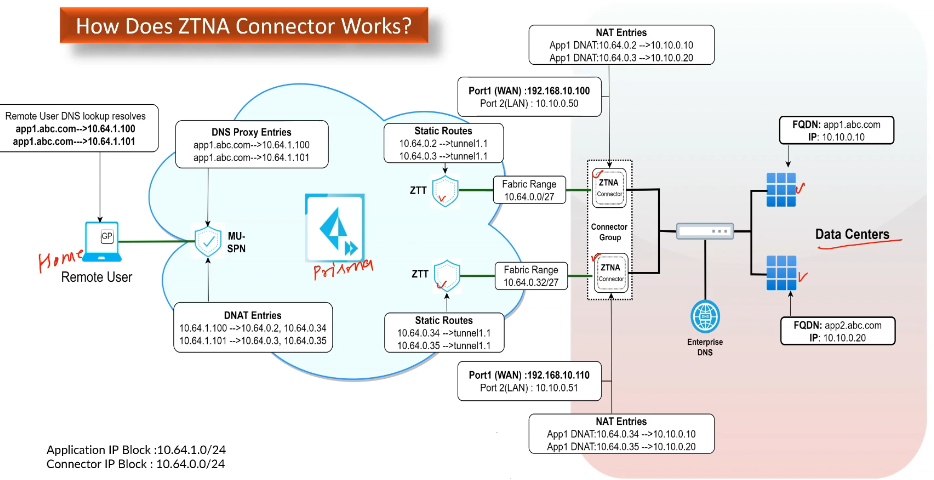
Prisma Access uses two internal IP blocks to route traffic through the Connector:
| Block | Purpose |
|---|---|
| Application IP Block | Address space used by Prisma Access to represent private apps internally (e.g. 10.64.1.0/24) |
| Connector IP Block | Address space assigned to Connector VMs for their IPSec tunnel interfaces (e.g. 10.64.0.0/24) |
Both blocks are configured at onboarding time and must not overlap with existing routes.
Packet Flow — User to Private App
flowchart TD
    A["User sends request<br/>to app.example.com"]
    B["GlobalProtect / RN resolves<br/>FQDN → Application IP Block address"]
    C["Traffic enters Prisma Access<br/>at MU-SPN or RN-SPN"]
    D["Prisma Access routes<br/>via IPSec to Connector<br/>(Connector IP Block)"]
    E["Connector translates<br/>back to real app IP<br/>and forwards to app server"]
    F["🖥️ Private App<br/>receives traffic"]

    A --> B --> C --> D --> E --> F
Key points:
- The user never has a routable path to the real app IP — all routing is internal to Prisma Access
- The app server sees the request arriving from the Connector's IP (within the App IP Block)
- Supports TCP, UDP, and ICMP
-
Server-Initiated Traffic (ZTNA Connector image 6.2.8-ztna-connector-b1+)
Connectors support bidirectional communication — the app server can initiate sessions back to GlobalProtect users or remote network hosts. This requires the Connector to run image 6.2.8-ztna-connector-b1 or later; Prisma Access 5.0 is the general baseline for ZTNA Connector itself, but server-initiated traffic is a more recent, separately-gated addition — it isn't listed among Prisma Access 5.0's own ZTNA Connector release notes:
- Connector performs SNAT on server-initiated traffic using its IPSec tunnel interface IP (from the /27 Connector IP Block prefix)
- Traffic routes through Prisma Access fabric to the destination
- Destination does not need to hold private DC prefixes in its routing table
- Supported routing: dynamic BGP (Connector advertises prefixes to DC router) or static (manual next-hop config)
Key Takeaways
- Three use cases: overlapped networks, DC-to-cloud migration, partner access — all solved without manual NAT or routing
- Packet flow uses two internal IP blocks: Application IP Block (app addresses) and Connector IP Block (tunnel interfaces)
- Users access apps via FQDN — real app IPs are never exposed in the routing fabric
- Server-initiated (bidirectional) traffic supported via Connector SNAT, requiring Connector image 6.2.8-ztna-connector-b1+ (not a Prisma Access 5.0 feature itself, though PA 5.0 remains the general ZTNA Connector baseline)
Previous: Chapter 20 — ZTNA Connector Overview & Components · Next: Chapter 22 — ZTNA Connector vs Service Connections